
We live in an increasingly digital world, and video has become one of the clearest ways to explain complicated things. Because those explanations now travel across websites, learning platforms, intranets and social feeds, the same video often needs to work in more than one place.
That creates a practical problem: one message may need several formats.
In fact, social videos get shared twelve times more often than text and images combined.
 Man using Cerebriam Studio to create vertical, horizontal, and square videos.
I hear your brains whirring:
““But good video is hard enough to make once. Do I really have to resize, reframe and reedit it for every channel?”
That is exactly the problem Cerebriam Studio was built to solve.
Most popular platforms and publishing environments support more than one aspect ratio, and each format changes how your video feels. A horizontal video can work well for a website or presentation, while a vertical version may be better for mobile viewing. A square version might work best in a feed, and a semi-vertical version can give you more space without taking over the whole screen.
If you are making content for education, training, communications or public information, this matters. The message needs to stay clear wherever it appears.
You could use separate tools for each format – an Instagram video creator, a YouTube video editor, a TikTok video editor, or different templates for each platform. But that quickly becomes slow, expensive and repetitive.
If you have the time you may invest in an Instagram video creator, a YouTube video editor, or TikTok video editor. But when you think of the need for an active presence on all platforms (and the different aspect ratios used) the human resource can rise quickly. As an alternative, Cerebriam’s m:atio technology (a portmanteau of multi-aspect ratio) can help you quickly make multiple aspect ratio videos in a few clicks. It even helps you select the best aspect ratio for your chosen platform.
Below is a quick review of popular aspect ratios (video size or dimension) and where they are useful. Use this information with your aspect ratio video editor to create the most effective content.
Aspect Ratios & Their Platforms
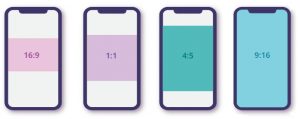
16:9 | Landscape
16:9 is the classic landscape aspect ratio. You will recognise it from YouTube, websites, presentations, webinars and HD television.
It is a good choice for:
- training videos;
- webinars;
- presentations;
- websites;
- long-form explainers;
- YouTube;
- LinkedIn and professional publishing.
Landscape works well when you need space for slides, screens, demonstrations or wider scenes. However, if you upload a non-16:9 video to a platform that expects landscape, the platform may add black bars or crop the video in a way that damages your composition.
9:16 | Vertical
9:16 is the full-screen vertical format used across mobile-first environments such as TikTok, Instagram Stories, YouTube Shorts, Snapchat and Facebook Stories.
Think of it as your full phone screen.
It is useful for:
- short mobile explainers;
- learning reminders;
- quick updates;
- campaign clips;
- mobile-first news;
- social-first versions of longer content.
Vertical video is not only for entertainment. It can be an effective way to make important information easy to watch on the move.
4:5 | Semi-Vertical
4:5 is a semi-vertical format often used in feeds on platforms such as Instagram and Facebook.
It gives you more vertical space than a square video, but it does not take over the full phone screen like 9:16.
It is useful for:
- social feed versions;
- campaign clips;
- educational snippets;
- internal updates;
- content where a person, caption or visual needs more room.
This format can be a good compromise when you want your video to feel mobile-friendly without going fully vertical.
1:1 | Square
1:1 is the square format most commonly associated with Instagram, but it also appears across Facebook, X, LinkedIn and other feeds.
Square video is compact, balanced and easy to reuse.
It is useful for:
- social posts;
- short explainers;
- quote videos;
- campaign messages;
- announcements;
- snippets from longer videos.
It is not always ideal when you need to show a full body, a wide environment or detailed screen content, but it can work well for simple, focused messages.
Conclusion
Aspect ratio is not just a technical detail. It changes how your message is seen, understood and shared.
With Cerebriam’s m:atio technology, you can create vertical, semi-vertical, landscape and square videos without rebuilding your content from scratch. Make one clear explanation, choose the formats you need, and let Cerebriam do the heavy lifting.
That is m:atio – multiple aspect ratio video production without the technical faff.
Explain it once. Share it everywhere.
